Reviews
Cute Character Creator Studio offers a fun and relaxing design experience. The extensive wardrobe and color palette let you create truly unique avatars. Regular updates keep the content fresh, and the simple interface makes it accessible for everyone. A great choice for anyone who enjoys creative expression.
Description
Game Introduction
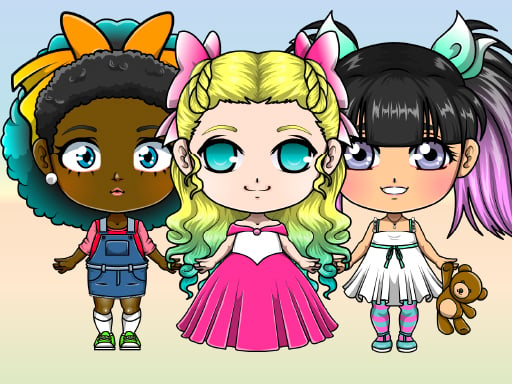
Cute Character Creator Studio is a creative online game focused on designing and personalizing anime-style avatars. The main goal is to express individual style by customizing every part of a character, including hairstyles, facial features, and a wide selection of clothing and accessories. Players can create either a male or female character, choosing from items like tops, bottoms, skirts, shoes, socks, and neckwear. Additional accessories such as earrings, necklaces, hats, hair clips, and even a pet companion add further uniqueness. A key feature is the extensive color palette with many vibrant shades, allowing players to paint different areas of each item using two color slots. The game is designed to be intuitive and suitable for all ages, encouraging creativity without complex mechanics. It is regularly updated with new content inspired by seasonal themes and popular anime series, making each visit feel fresh. Players can save their creations in full body or portrait mode, perfect for original characters or a stylized version of themselves.
How to Play
To start, players select a base character and then choose from various hairstyles, face shapes, and body types. The clothing menu offers a range of items to build an outfit, including tops, bottoms, skirts, shoes, socks, and neckwear. Accessories such as earrings, necklaces, hats, and hair clips can be added for extra personalization. A pet companion can also be selected to accompany the avatar. The color palette is accessed by clicking a brush icon, where players choose Color 1 or Color 2 to paint different sections of each item. With many colors available, experimentation is encouraged. Once satisfied, the creation can be saved in full body or portrait mode. The interface is straightforward, allowing players of all ages to enjoy the design process.
Game Features
Cute Character Creator Studio includes a large selection of clothing and accessories for character customization. A color palette with many colors allows detailed painting of each item using two color slots. Players can add pet companions to their avatars. The game offers save options in both full body and portrait modes. Regular updates introduce new seasonal and anime-inspired content, keeping the experience fresh. The design process is intuitive and accessible, making it easy for anyone to create unique characters.
Tips for Success
To get the most out of the game, experiment with different color combinations using the two color slots to create unique looks. Try mixing various clothing items and accessories to discover new styles. Save creations regularly to build a gallery of favorite designs. Since the game updates often, check back frequently for new seasonal and anime-inspired items to keep avatars fresh and trendy.



Comments
Sign in to leave a note
You must be logged in before posting a review or rating.
No account? Create one
No comments yet. Be the first to comment!